One person. Several appointments. Every hour paid right.
A university employs professional staff on flexible hours, casual professionals, sessional academics paid by the activity, and people who hold several of these at once. Our product applies each enterprise agreement across all of them, as the work is planned, entered and paid.
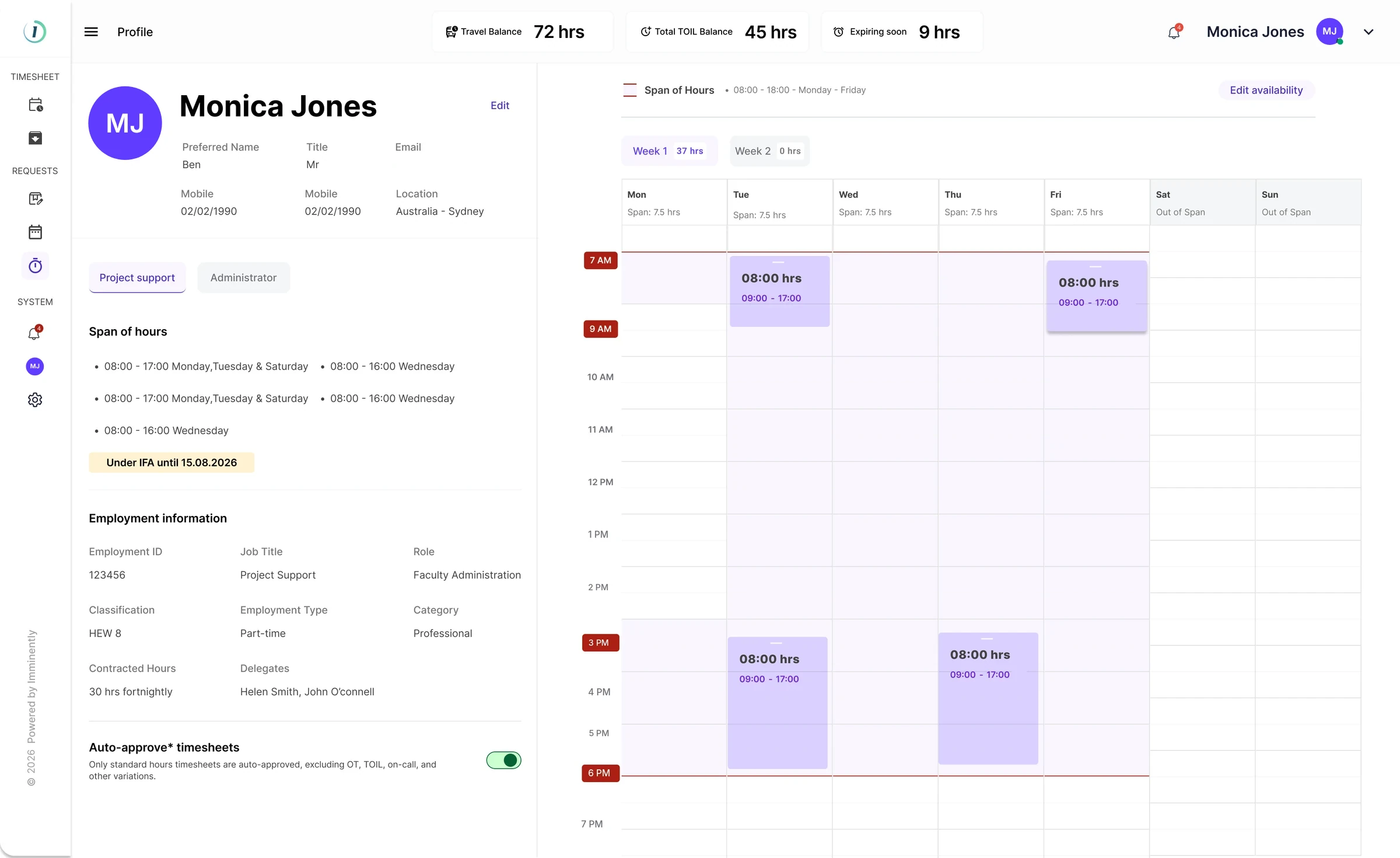
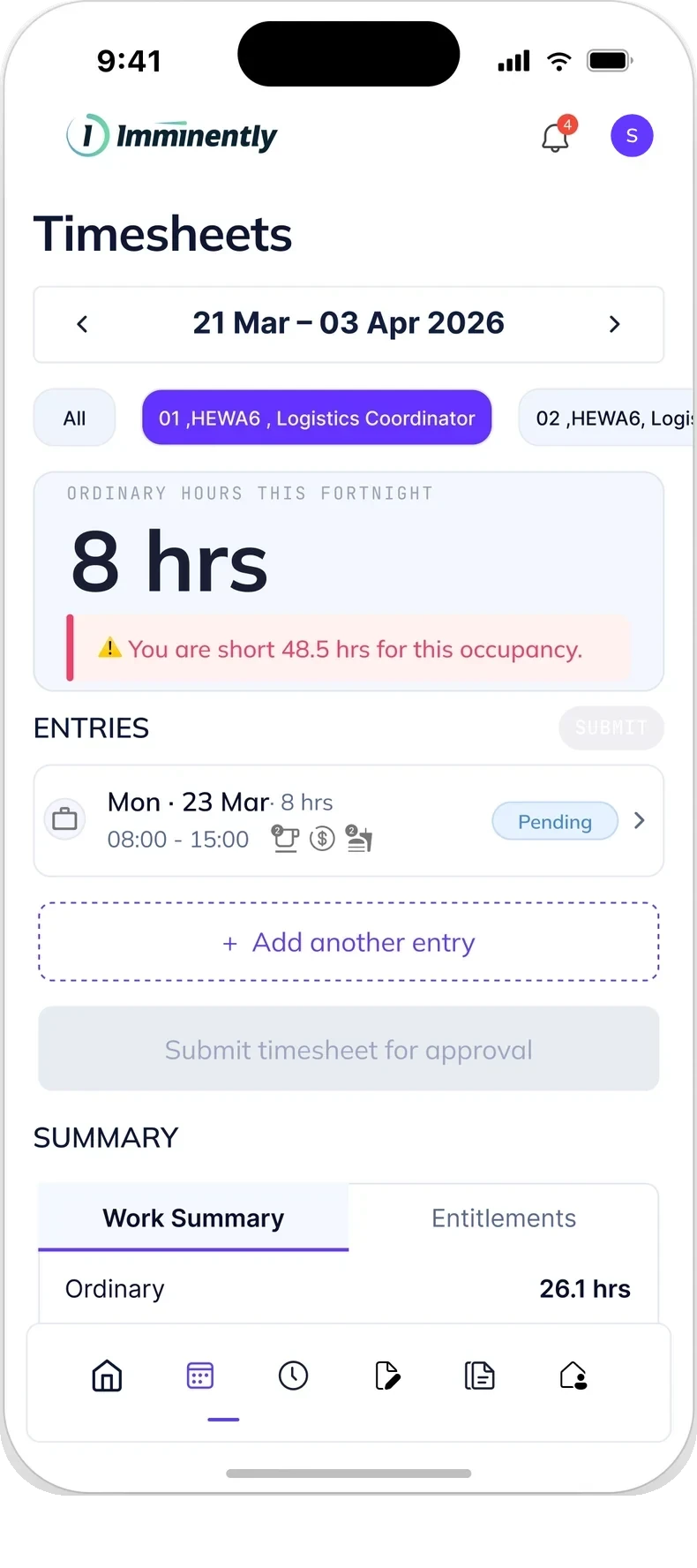
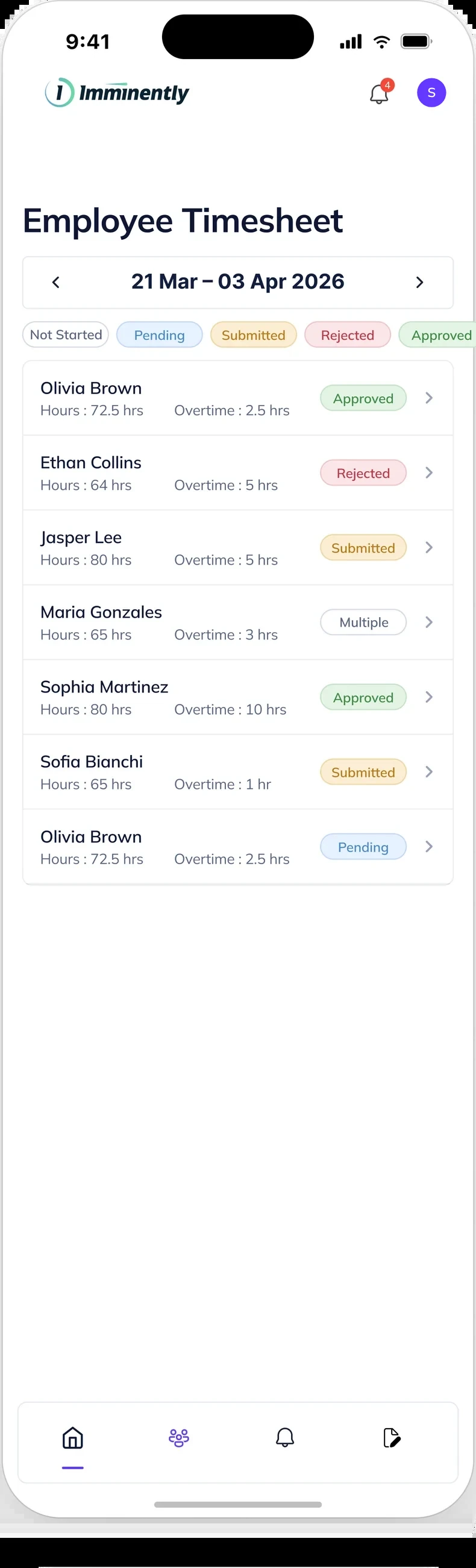
An employee’s profile with their span of hours, a flexibility arrangement in force and availability, and the fortnight’s timesheet on the phone, filtered by position.
7,000+professional, casual and sessional academic staff on our product at Queensland University of Technology (QUT)
2 agreementsprofessional and academic enterprise agreements interpreted together
Every appointmentone timesheet, with entitlements determined across appointments where the agreement requires it
Co-designedwith QUT and the education sector, so multiple appointments are standard
THE UNIVERSITY WORKFORCE
Six ways of working, often in one person.
A university’s workforce does not fit one timesheet. The same person can hold a continuing professional appointment and a sessional academic one, under different agreements and supervisors.
Ongoing and fixed-term
Professional staff
Hours-based work within a span of hours, flexible working hours schemes, overtime for eligible levels, time in lieu, travel time, on-call for some services, and individual flexibility arrangements.
Span of hours
Flexitime
Time in lieu
On call
Casual
Casual professional staff
Time entered only when worked, casual loading, minimum engagement with the reductions some agreements allow for students and people with a primary occupation elsewhere, and estimated hours for each engagement.
Minimum engagement
Estimated hours
Paid in arrears
Sessional
Sessional and casual academics
Lectures and tutorials paid at loaded rates that include associated working time, marking and other required activities paid time for time, repeat rates, and a minimum payment for each occasion of attendance where the agreement provides it.
Loaded rates
Time for time
Repeat rates
Occasions of work
Allocated
Continuing academics
Workload allocated and approved under the agreement and held in the workload system, with no timesheet to complete. Scheduled teaching can still be shown beside sessional hours.
Workload allocation
No timesheets
Shifts and events
Campus operations
Security, facilities, recreation, hospitality and student services working shifts, evenings, weekends and on call, with open days, graduations and campus events rostered alongside normal service.
Shifts and weekends
Event rostering
Credentials
Funded
Grant-funded and research positions
Engagements funded from a particular source, where claims are tracked against the allocation and a hard ceiling can be applied, with an authorised override.
Allocation tracking
Authorised override
THE AGREEMENTS
Agreements written for people, not for timesheets.
Universities are national system employers. Each has its own enterprise agreements, often one for academic staff and one for professional staff, over the higher education awards, with policies and individual arrangements beneath them. The hardest provisions are the ones that reach across appointments and occasions of work.
Clause typeWhat it providesWhat makes it hardWhat our product does
What it providesDaily and weekly triggers, such as ordinary hours beyond a set number in a day, and overtime periods that continue from one appointment into another.
What makes it hardAssessed per appointment, half an hour in one job and an hour in the next look like two short periods; the agreement may treat them as one.
What our product doesDetermines hours across all non-sessional appointments where the agreement requires it, and keeps them separate where it does not.
What it providesEach part-time appointment carries its own contracted hours.
What makes it hardAssessing hours only in aggregate can disadvantage someone holding several part-time appointments.
What our product doesNo part-time appointment accumulates ordinary hours beyond its own contracted hours, while aggregate triggers still apply.
What it providesEach hour of delivery carries a defined allowance of associated working time, which varies with the type of lecture or tutorial and whether it is a repeat.
What makes it hardWhen a repeat is delivered can turn it back into a full rate.
What our product doesRecords the delivery start and finish, then determines the hours each activity represents under its rate category.
What it providesMarking and other required activities are paid time for time, with a minimum payment for each occasion of work.
What makes it hardMarking from 9 to 11 and again from 12 to 1 can be one occasion; 9 to 11 and 2 to 3 are two, and the minimum applies to the second.
What our product doesAssesses occasions of work across appointments, so the minimum payment applies exactly where the agreement says it does.
What it providesA minimum payment for each engagement or attendance, with the reductions some agreements allow.
What makes it hardWhether a short attendance meets the minimum depends on what came before and after it.
What our product doesPays the minimum when it applies, automatically, and tells the supervisor.
What it providesA span of hours and a flexible working hours scheme for eligible levels, with some levels outside the scheme.
What makes it hardThe span is not held in the HR system; it follows from the agreement.
What our product doesInfers the span from the agreement and the employee’s position and work pattern, and applies any flexibility arrangement in force.
What it providesBalances with accrual rules, caps, expiry, extensions and payout.
What makes it hardEach balance has its own lifecycle and approvals.
What our product doesLedgers track accrual and use, show balances to staff and supervisors, warn as thresholds or expiry approach, and update only on approval.
What it providesNotice of on-call periods, an on-call allowance and minimum payments for attendance, remote work and call-back.
What makes it hardEach call is a separate fact with its own minimum.
What our product doesRecords on-call periods and each response, and determines the allowance and the minimum payment.
What it providesPeriodic assessment of whether casual employees are eligible to convert.
What makes it hardThe evidence is each casual’s hours in each position over time.
What our product doesHolds the hours each casual has worked in each position and work unit, as evidence for the assessment.
What it providesA varied span of hours agreed under the agreement’s own conditions, for a period.
What makes it hardThe arrangement changes how every following hour is treated, until it ends.
What our product doesManages the request, acceptance of conditions, approval, application and expiry of each arrangement.
SYSTEMS AND INTEGRATION
HR stays the system of record. Workload stays where it is planned.
Our product connects the plan to what is worked and paid. Academic workload allocation and the teaching timetable remain in their own systems; scheduled teaching can flow into sessional timesheets as planned work.
From HR and the timetable
Appointments and plans
Employees, appointments and positions, with classification, fraction, contract dates and supervisor
Estimated hours for each casual and sessional engagement
Work patterns, leave, delegations and higher duties
Scheduled teaching activities by academic, subject and activity type
Imminently Attendance Management
One timesheet, every appointment
Entries routed to each appointment’s supervisor
Agreements applied within and across appointments
Engagement hours tracked against allocations
A determination report for every work period
To payroll
Auto-pay aware
Pay codes, hours or units, account and cost codes, by job
Only additional items for staff paid standard hours automatically
All hours and units for casual and sessional staff paid in arrears
From end-of-session claims to agreement-accurate pay.
Where it hurtsTodayWith our product
Sessional claims
TodayClaims that restate the timetable, entered by hand at the end of the session and paid late.
With our productScheduled teaching flows into the sessional timesheet as planned work; the academic confirms or varies it, and the agreement determines the hours each activity represents.
Casual budgets
TodayOverspend on an engagement found after it has been paid.
With our productClaimed hours tracked against the estimate for each engagement, activity and subject, with progressive warnings, and a reason and additional approval when an allocation is exceeded.
Multiple appointments
TodayEach job assessed alone, so overtime and minimum engagement are missed.
With our productOne timesheet for every appointment, determined together where the agreement requires it, each job approved by its own supervisor and paid at its own rate and cost centre.
Auto-paid staff
TodayDuplicate payments where timesheets and automatic pay overlap.
With our productOnly additional items are sent for staff paid standard hours automatically; all hours are sent for casual and sessional staff paid in arrears.
Agreement change
TodayReconfiguring and retesting pay rules by hand.
With our productDate-effective rule versions, simulation of draft clauses, automated regression testing and future-dated activation.
Evidence
TodaySystem logs showing who changed what.
With our productA legal determination report for every work period, linking every outcome to the clause that produced it.
A UNIVERSITY WEEK
A week across two appointments, screen by screen.
A professional staff member who also holds a second appointment, a flexibility arrangement agreed under the agreement, and the supervisor and payroll at the end of the week. Staff steps are on the phone.
Staff, supervisor and payroll
From clock-in to the pay run.
01 / 09
Step 01 of 09 · Employee
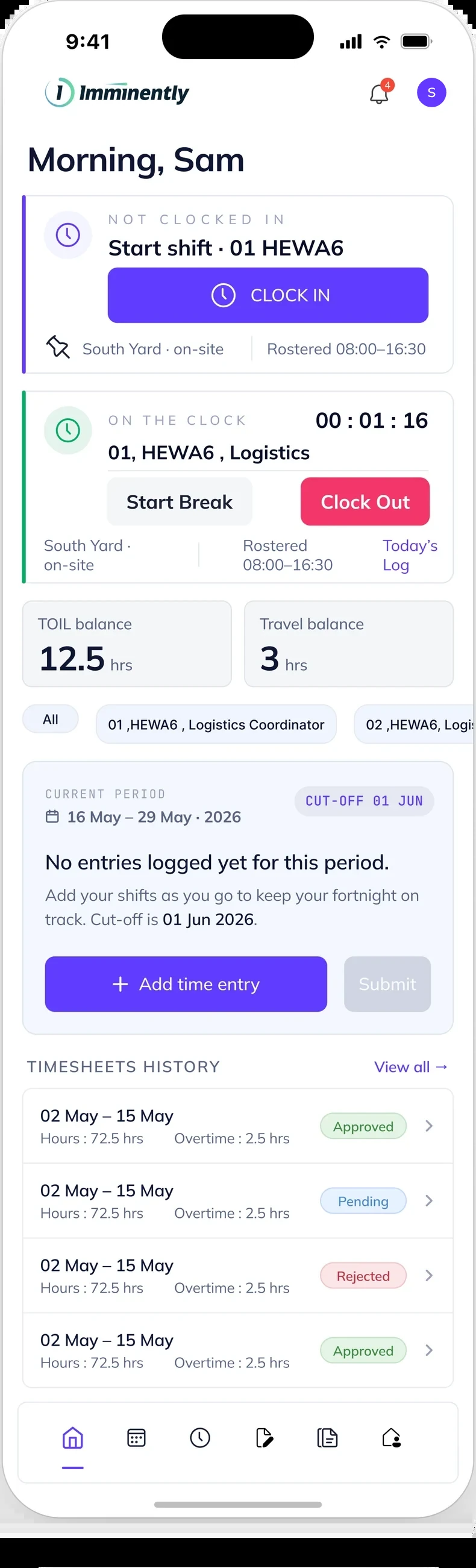
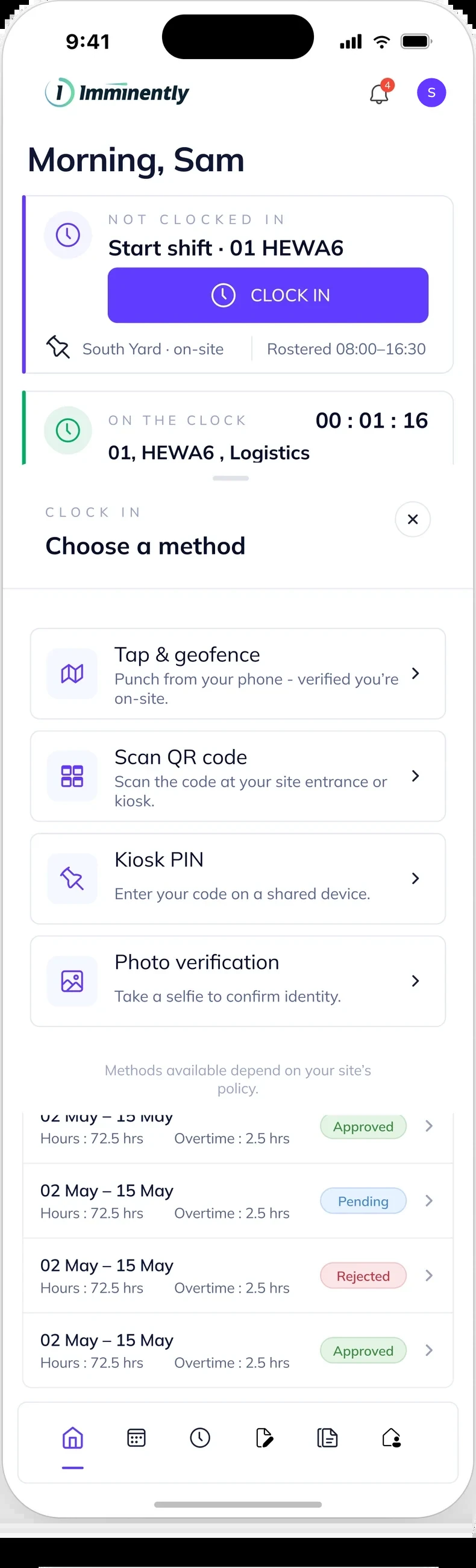
Clock in to the right appointment.
The rostered shift and position are on the home screen. Clock-in methods depend on the site’s policy, such as tap and geofence, a QR code or photo verification.
Step 02 of 09 · Employee
The entry knows the agreement.
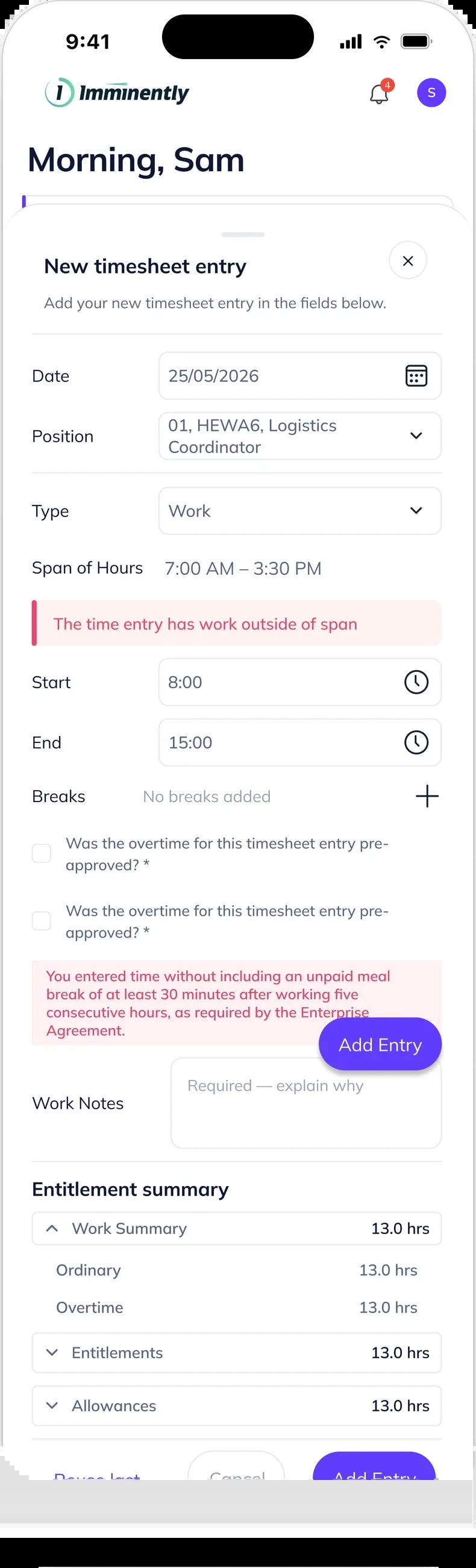
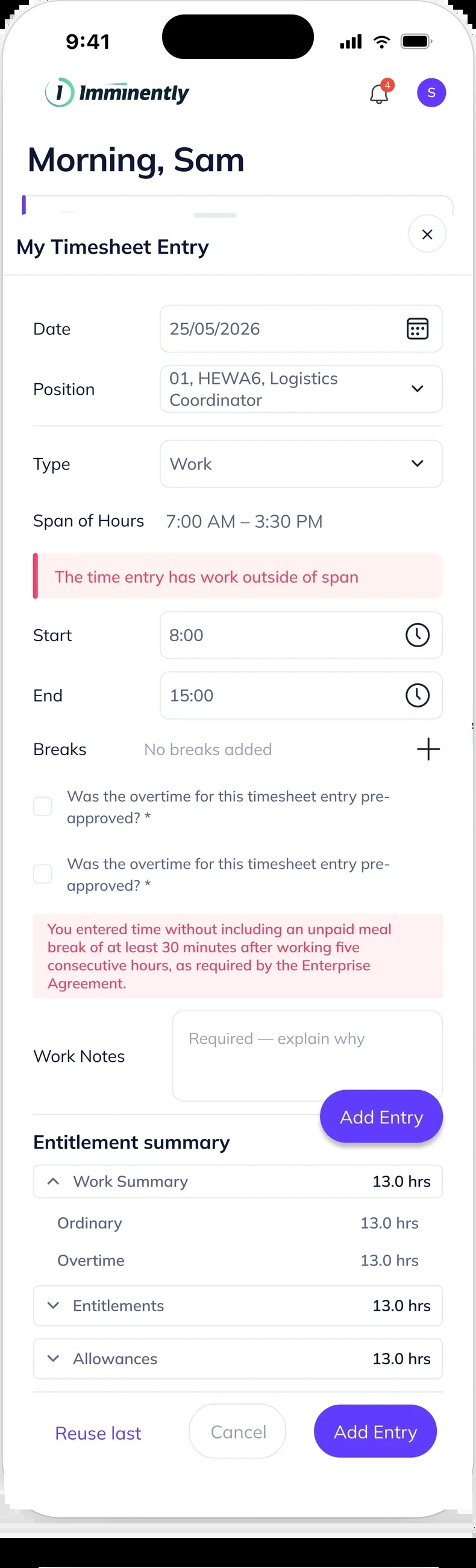
A new entry asks for the position, the time and the breaks. Work outside the span of hours is flagged as it is entered, overtime asks whether it was pre-approved, and a missed meal break is explained against the agreement.
Step 03 of 09 · Employee
Each appointment keeps its own hours.
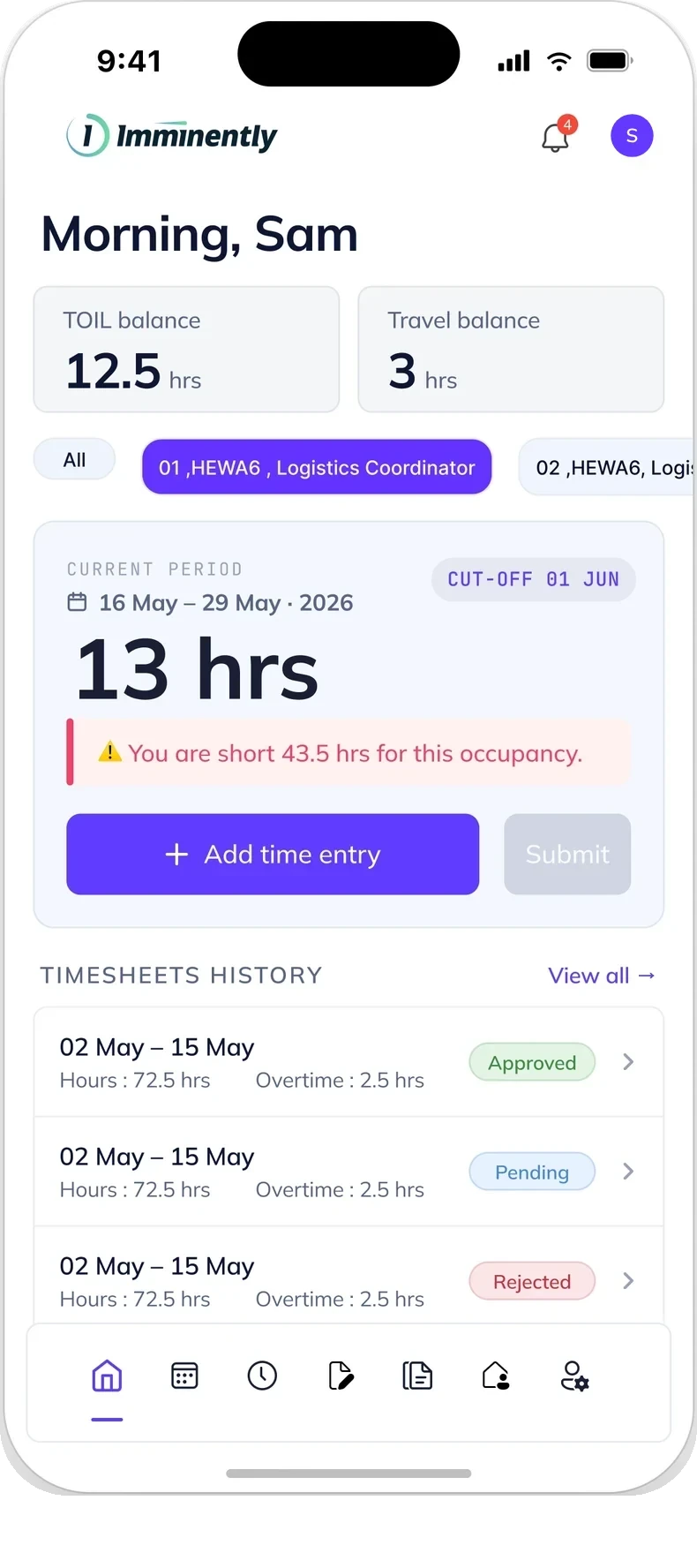
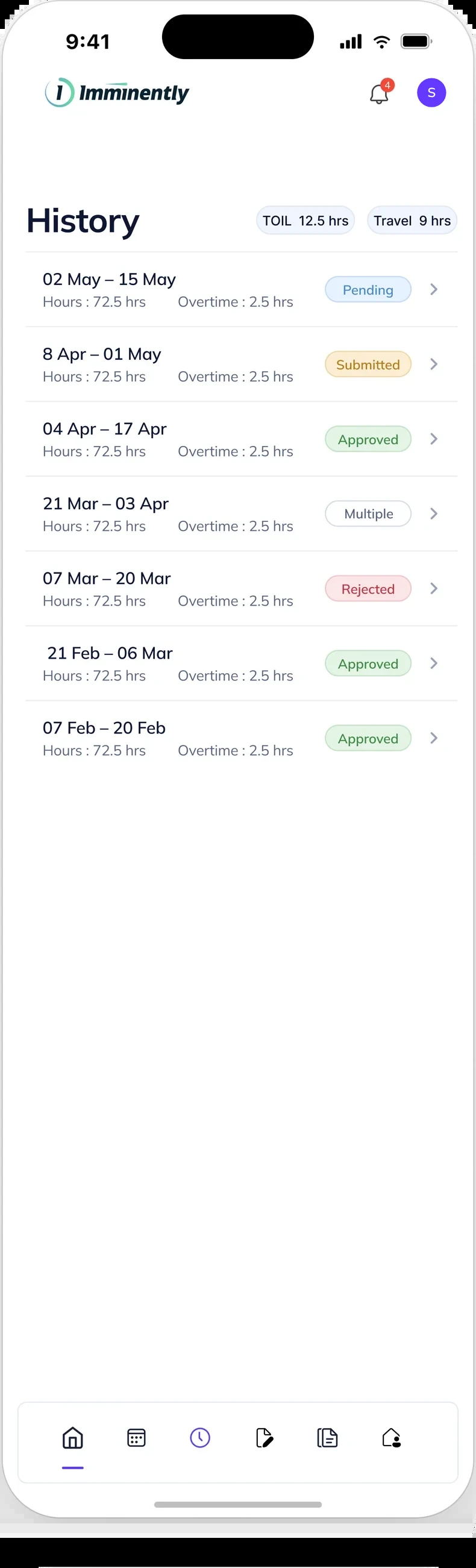
The home screen shows the hours this period and a shortfall for the appointment, and the history keeps every period with its status.
Step 04 of 09 · Employee
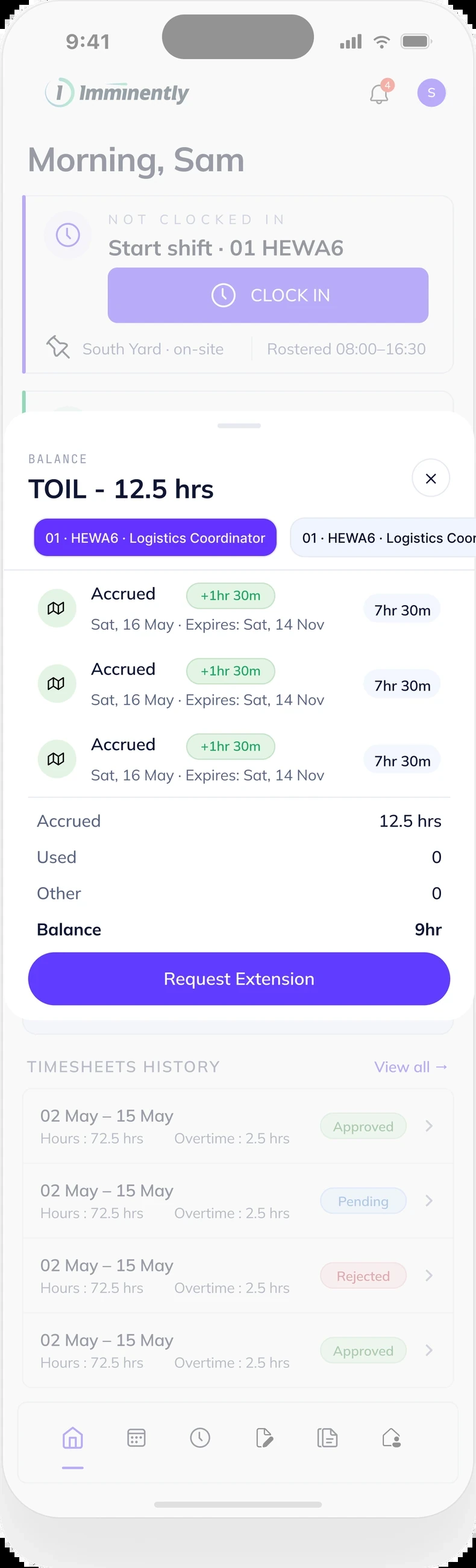
Balances, with their expiry.
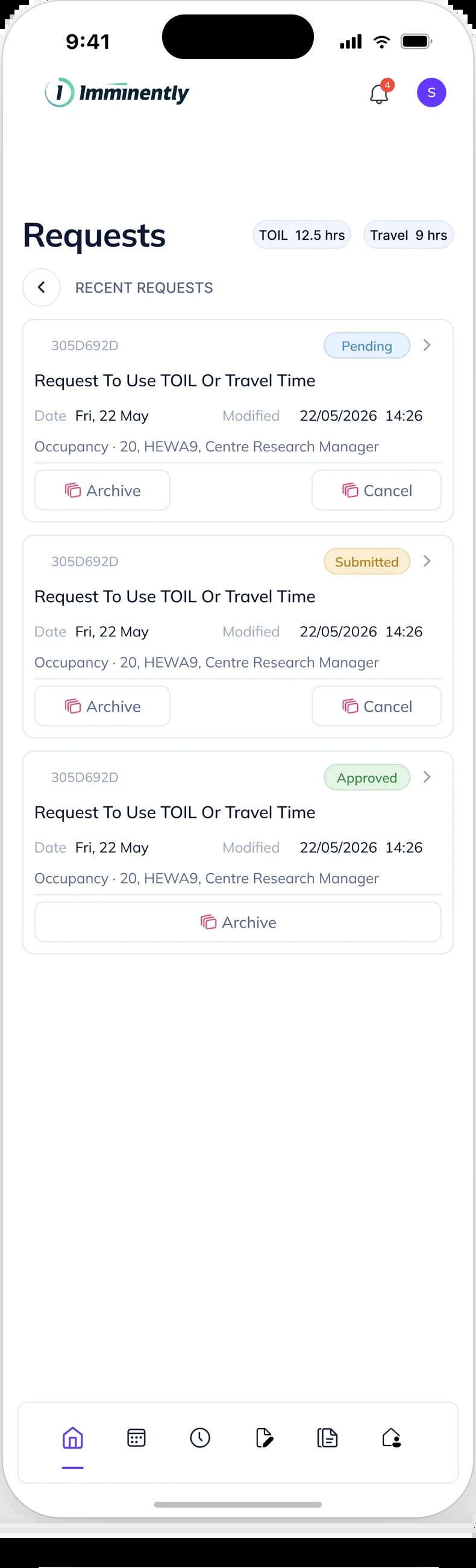
The time in lieu balance shows what was accrued, used and when it expires, with a request to extend. Requests to use time in lieu or travel time show their status.
Imminently Timesheets · flexibility arrangement
Step 05 of 09 · Employee
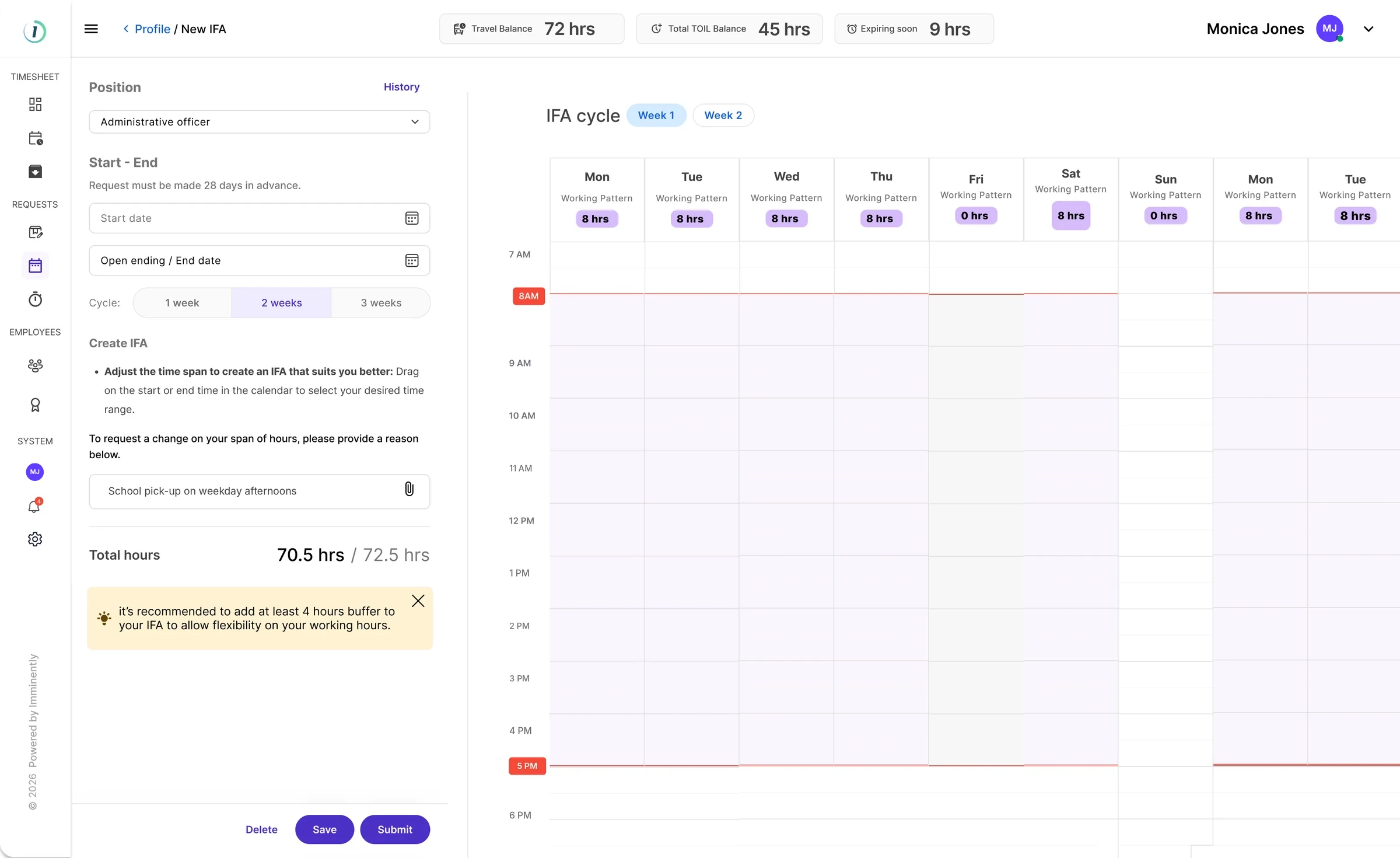
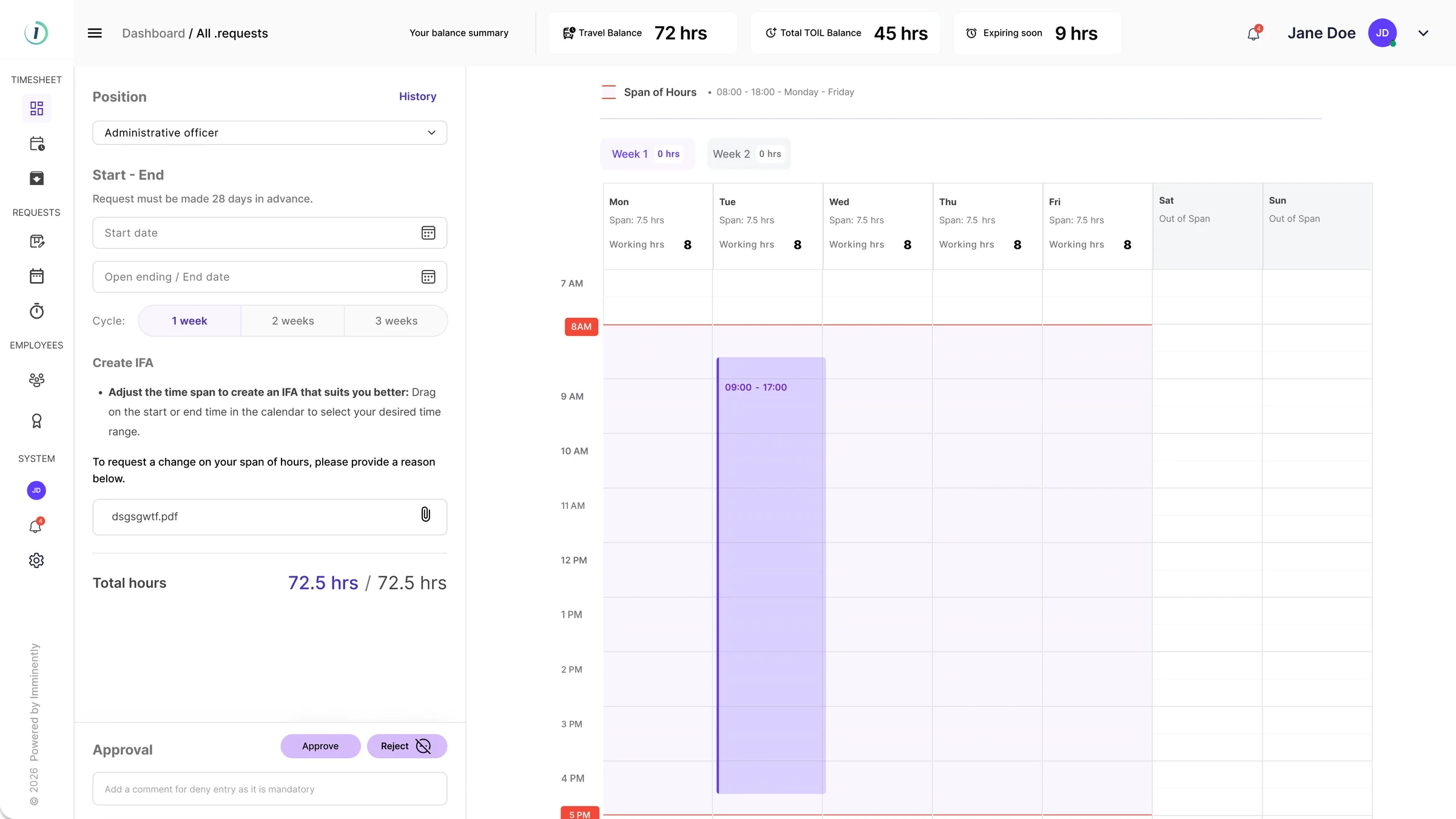
A flexibility arrangement, drawn on the calendar.
The employee sets out a varied span of hours over a one, two or three week cycle. The hours are totalled against the requirement, with advice to keep a buffer.
Imminently Timesheets · accept the conditions
Step 06 of 09 · Employee
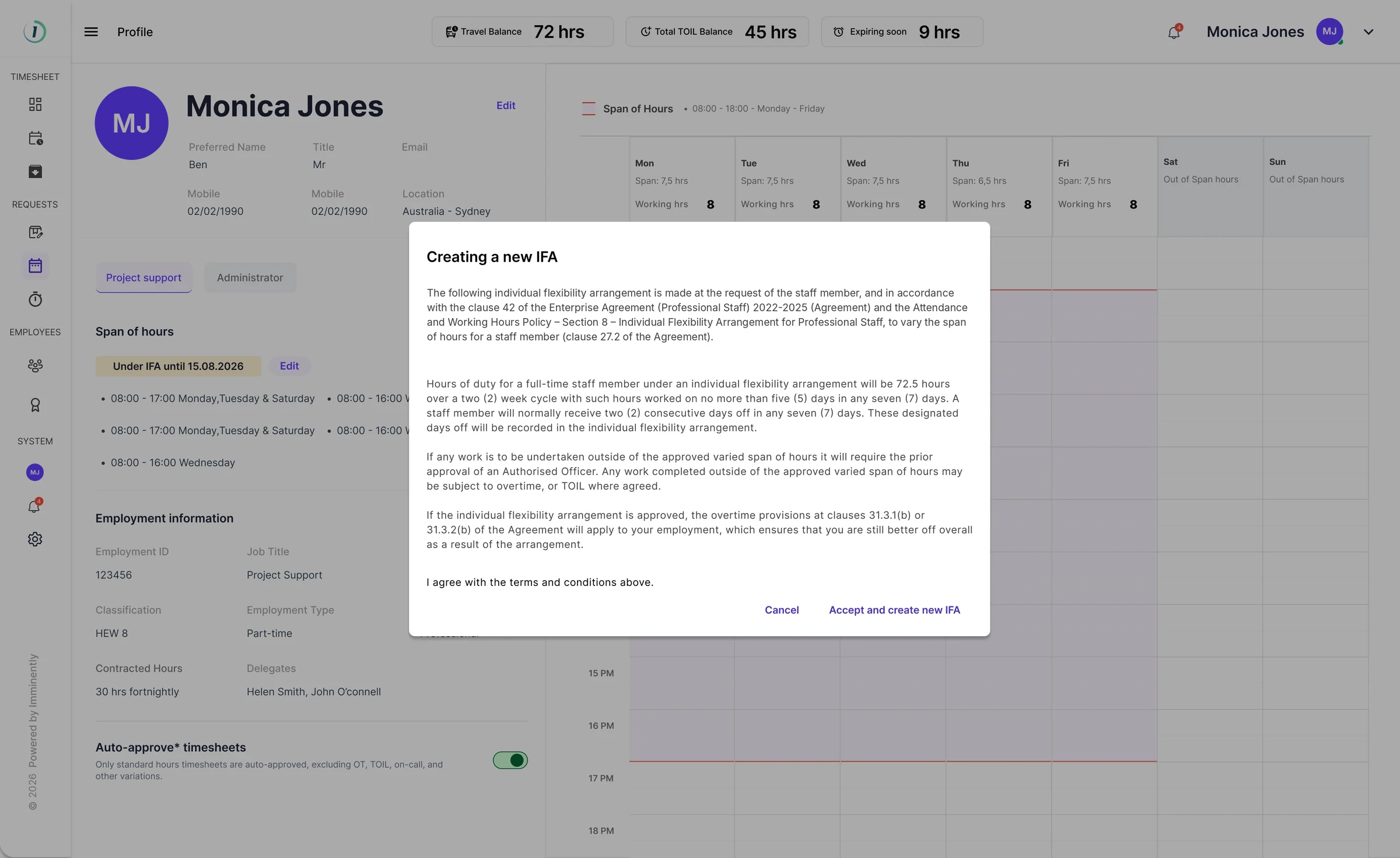
The agreement’s conditions come first.
Before the arrangement is created, the employee accepts its conditions, drawn from the enterprise agreement’s clauses on flexibility, hours of duty and overtime.
Step 07 of 09 · Supervisor
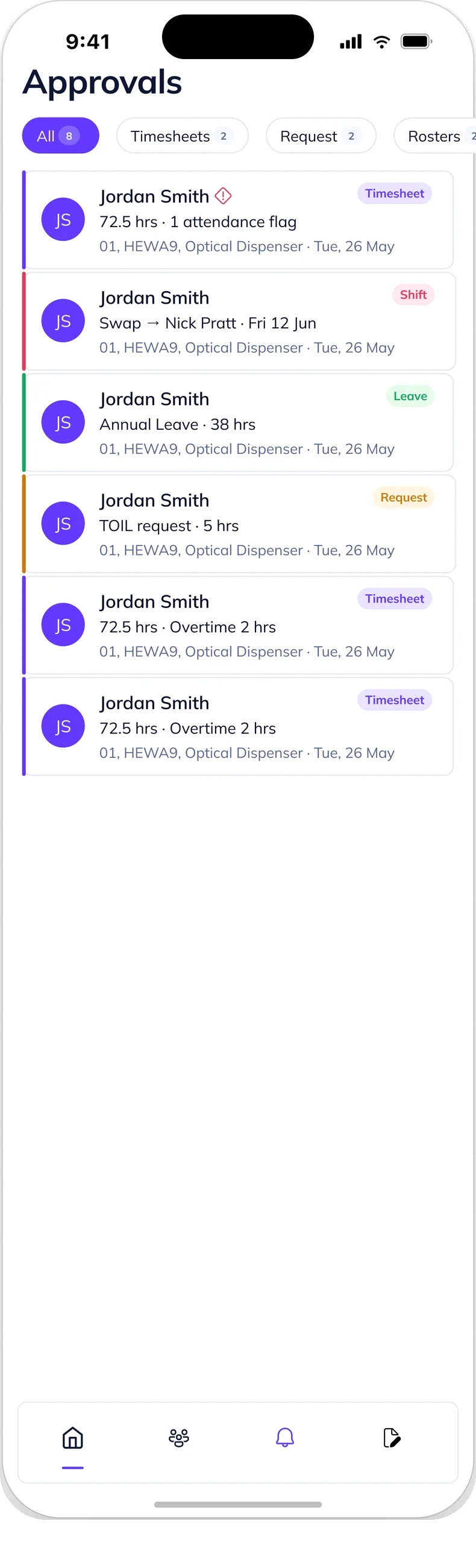
Supervisors approve their own appointments.
One inbox holds timesheets, requests, roster changes and leave with attendance flags, and the team list shows every employee’s status for the period. Approval follows the job, so a supervisor approves only the work in their area.
Imminently Timesheets · approve the arrangement
Step 08 of 09 · Supervisor
The supervisor decides the arrangement.
The proposed cycle is shown against the span of hours with its total, and approved or rejected with a comment. Every draft, current, rejected and deactivated arrangement is kept.
Imminently Timesheets · payroll
Step 09 of 09 · Payroll
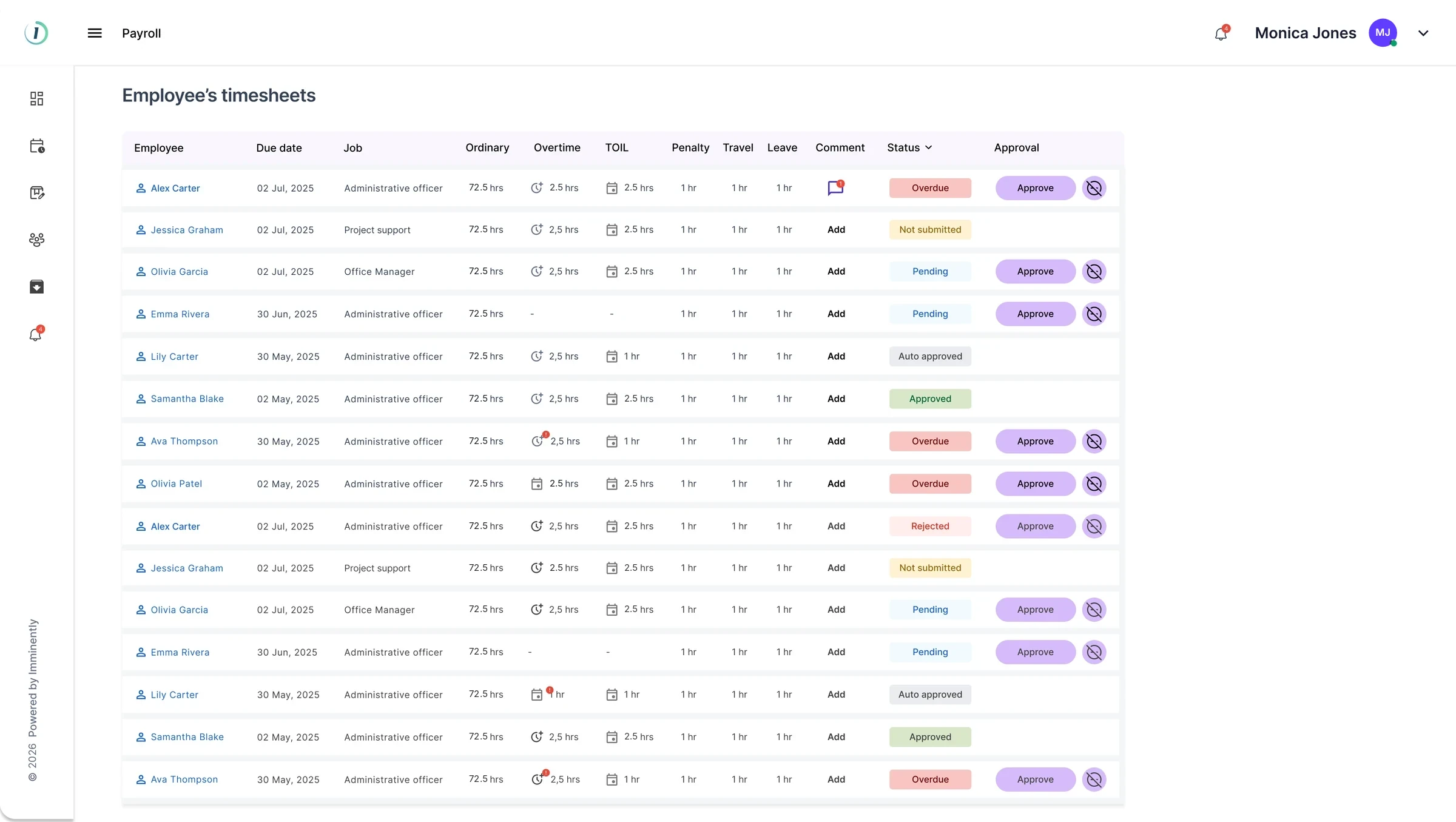
Every timesheet checked before the pay run.
Payroll sees each employee’s ordinary, overtime, time in lieu, penalty, travel and leave hours with the timesheet’s status: overdue, not submitted, pending, auto approved, approved or rejected.
People, positions, classifications and hours shown are examples.
THE HIGHER EDUCATION TEMPLATE
Best practice, already configured.
Every university implementation starts from our higher education template, the best-practice configuration for professional, casual and sessional staff that we maintain. A new agreement starts from what is common, and the build concentrates on the provisions that differ.
What the template brings
Cohort models for professional ongoing and fixed-term, professional casual and sessional academic staff, each with its own timesheet behaviour, interpretation and payroll output.
Rules for multiple appointments, occasions of work and minimum engagement that hold across agreements.
Ledgers for time in lieu, flexitime and travel time, with staged notifications, extensions and payout.
Individual flexibility arrangement management, from request to expiry.
Versioned timesheets and delta-only payroll output for corrections, with auto-pay awareness.
Notifications, delegations and approval routing by job.
Integration through the certified adapter for TechnologyOne, or the proven third-party payroll pattern.
How it goes live
01Mobilise
Agree the boundaries, owners, governance and the delivery plan.
02Plan
Analyse your agreements clause by clause, confirm the populations each provision applies to, and record every assumption for your confirmation.
03Deliver
Apply the template, build the provisions that differ, and map pay codes, cost codes and approvals.
04Test
Run automated scenario packs, including multiple appointments and edge cases, and compare outcomes with your current system to isolate every difference.
05Deploy
Train staff and supervisors, go live with hypercare, and monitor the payroll hand-off before each cut-off.
06Operate
When your agreement changes, the new version is modelled, tested and released with its effective date.
PROOF
In production, not on paper.
In productionMore than 7,000 staff
Our timesheets, with Awards, run at QUT for more than 7,000 professional, casual and sessional academic staff under two enterprise agreements, integrated with its HR and payroll through its integration platform. Outcomes were compared with the legacy systems before go-live.
With TechnologyOneThrough the certified adapter
James Cook University (JCU) uses our product with TechnologyOne HR and payroll through the certified adapter, for timesheets, award interpretation, time in lieu and flexitime under its enterprise agreement.
Co-designedWith the sector
Our timesheets were co-designed with QUT and the education sector, so multiple appointments, sessional rates and minimum engagement are handled as standard.
In use at
Queensland University of Technology (QUT)Higher education
James Cook University (JCU)Higher education
SERVICES AS SOFTWARE
Your agreements are part of the service.
We provide, digitise and maintain your in-scope agreements as part of the software outcome. Your university confirms its interpretations, its data and its acceptance decisions.
No. Workload allocation and the teaching timetable stay in their own systems. Scheduled teaching can flow into sessional timesheets as planned work, and our product determines the hours and pay each activity represents.
Can a person with several appointments use one timesheet?
Yes. Each appointment keeps its own position, classification, contracted hours, supervisor and cost centre, while the person enters time for all of them in one place.
How are loaded rates and marking handled?
The academic records the delivery start and finish. Our product determines the associated working time from the rate category, pays marking and other required activities time for time, and assesses occasions of work for the minimum payment.
What about staff paid automatically?
For staff paid standard hours automatically, only additional items such as overtime, penalties, allowances and time in lieu are sent, so nothing is paid twice. Casual and sessional staff paid in arrears have all hours sent.
How is casual conversion supported?
Our product holds the hours each casual has worked in each position and work unit, which is the evidence the assessment needs.
Does it work with TechnologyOne?
Yes, through the certified adapter. Other HR and payroll systems connect through open integration, as in production today.
What happens when our agreement is renegotiated?
The new agreement is digitised and tested as a new version with its effective date, and proposed changes can be modelled before they are finalised. Earlier periods keep the rules that applied.
See it in your context
Bring a real workforce scenario.
Bring a person with two appointments, a sessional engagement and your agreements. We will show them in our product, clause by clause.