Built once, shared
The two state awards are digitised and maintained once and shared across councils, not rebuilt for each one.
NSW Council Cloud is our product pre-built for New South Wales councils: a best-practice Attendance Management configuration on both state awards, the Local Government (State) Award 2026 and the Local Government (Electricians) (State) Award, maintained once for every council. Each council’s own agreements and policies are scoped with it and run as its own layer, in its own secure tenancy.
When either award is varied, the base is updated once, regression tested and released to every council with its effective date.
Every other council on NSW Council Cloud has its own agreements and policies, in its own tenancy, on the same base.
NSW Council Cloud is built in two layers. The base is the same for every council and is maintained once. Each council’s own agreements and policies sit on top of it, in that council’s tenancy, scoped with the council when it joins.
Councils under the two state awards interpret the same provisions. NSW Council Cloud solves them once, keeps them solved, and leaves each council’s own arrangements to its own layer.
The two state awards are digitised and maintained once and shared across councils, not rebuilt for each one.
When either award changes, the shared base is updated once, regression tested and released to every tenancy with the change’s effective date.
Entitlement scenarios, user acceptance and parallel pay runs prove the shared base before it reaches your council.
Each council runs in its own isolated tenancy in Australian data centres, with its own data, configuration, local arrangements and environments.
The two state awards are the statewide baseline. Councils then vary them in distinct ways, each with its own limits and tests. Our product holds each layer in its own terms, with its effective dates, so the right rule applies to the right cohort on the right day.
Ordinary hours, spans, penalties, overtime, allowances and leave for the council employees each covers. The 2026 award operates from the first pay period on or after 1 July 2026 (cl. 47(v)); employees covered by the Electricians award are outside it (cl. 47(iii)(b)).
The floor for every other layerMade between a council and the unions. They substitute for the award only on performance and reward, payment of employees, travelling and camping allowances, hours of work, overtime, holidays, part-time and job share.
Not below entry-level rates; in writing, with dates of operation and expiryAgreement between the employer and the union on hours of work, weekend penalties and shift penalties.
The agreement of the employer and the unionMay vary any provision of the award, including those outside the council agreement list.
No net detriment against the award as a wholeAnnualised salaries, employee-requested weekend or out-of-span work, excess hours agreements for senior bands, and requests for flexible working.
Cl. 14: no less than the award over the year, reviewed at least annually. Cl. 21B: better off overall when made. Cl. 20B(iii), 20C(vi): requested in writing, with a review period. Cl. 24: may be refused only where the refusal is not unreasonable.When a council or enterprise agreement is terminated, the award’s savings provision (cl. 45(ii)(b) and (c)) applies: unless otherwise agreed, employees in regular receipt of penalty rates, shift penalties, aggregate rates of pay or other arrangements that compensate for hours of work keep those benefits or the clause 20 payments, whichever is higher. So an agreement can affect pay after it ends. Our product keeps every version with its dates, so each period is paid under the arrangement that applied.
These are the provisions of the Local Government (State) Award 2026 that depend on function, the cycle or the day before. Each is digitised from the award’s own text.
What it provides38 hours a week, or 35 for listed functions such as administration, engineering (professional and trainees), finance, library and town planning, arranged over one to four weeks, with no more than 12 ordinary hours in a day.
What makes it hardA nine-hour day inside a balanced cycle is not overtime; the cycle decides.
What our product doesDetermines ordinary hours against the averaging cycle, the daily maximum and the minimum days off; a roster check for them is configured in the deployment.
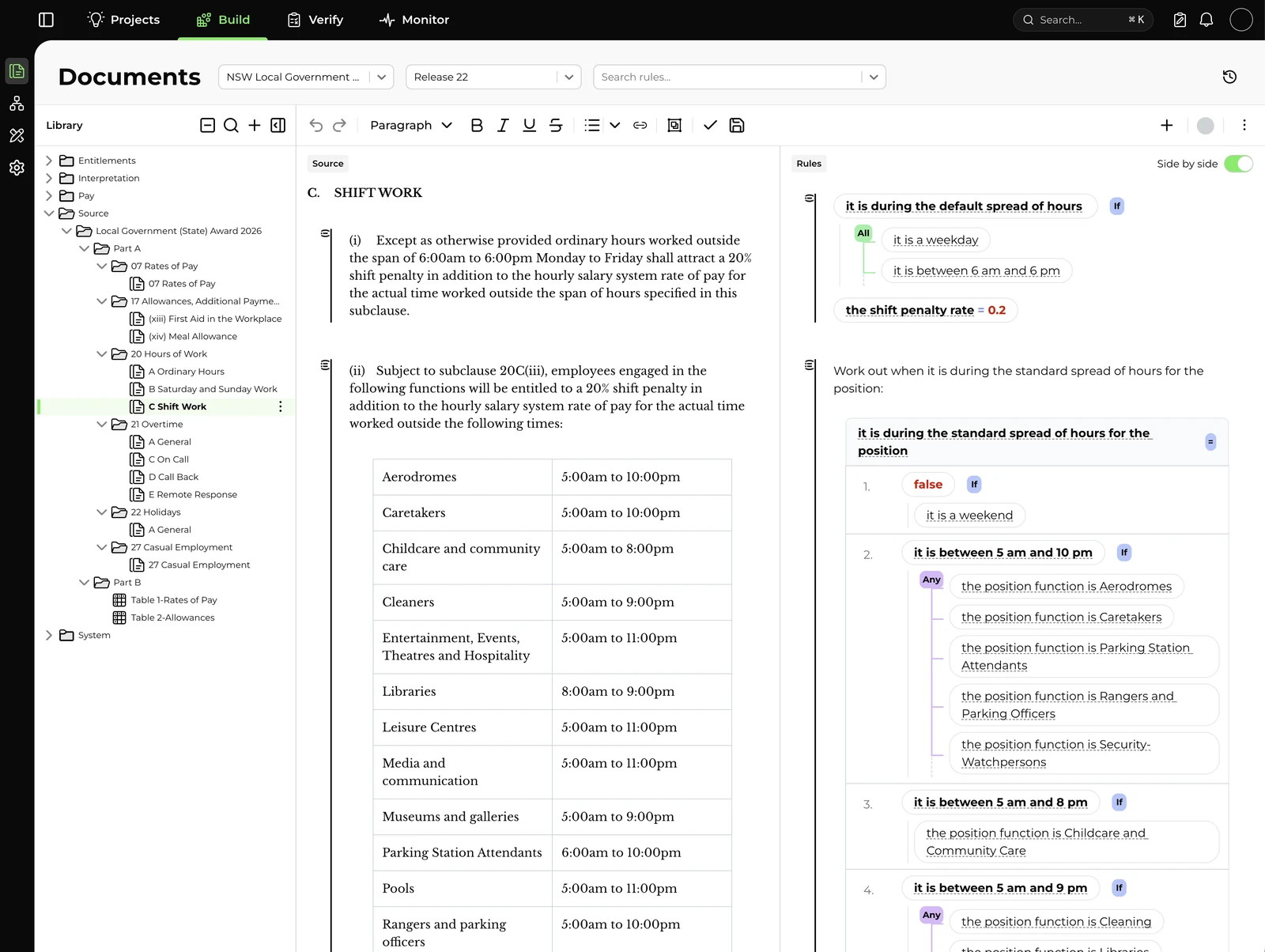
What it providesA 20% shift penalty for weekday ordinary hours outside 6am to 6pm. Function-specific spans replace that window: libraries 8am to 9pm, pools and leisure centres 5am to 11pm, rangers and parking officers 5am to 10pm.
What makes it hardThe 6am to 6pm window is the edge of the penalty, not a limit on ordinary hours, and it moves by function.
What our product doesSpans are set by function on each shift template, so out-of-span hours are flagged as time is entered.
What it providesPenalties for ordinary hours on Saturday and Sunday, doubled for listed functions including parks and reserves, garbage, road construction and maintenance, sewerage, stores and depots, waste and water.
What makes it hardThe function of the position decides the rate, and an employee-requested weekend arrangement removes it.
What our product doesApplies the penalty for the function worked and the arrangement in force on the day.
What it providesTime and a half for the first two hours and double time after; on Saturday the same, with double time after 12 noon; on Sunday, double time. Work on a rostered day off is overtime.
What makes it hardAn employee (other than a casual) who works four or more hours of overtime after an ordinary shift without ten consecutive hours off in the 14 hours before the next ordinary shift, or overtime after two consecutive ordinary shifts without ten consecutive hours off, is released until they have had ten consecutive hours off duty, without loss of pay for ordinary working time in that absence; if instructed to resume without the break, they are paid double time until released and are then entitled to a ten-hour break without loss of pay. The subclause does not apply where an employee works less than four hours of remote response on any one day (cl. 21A(v)).
What our product doesBuilds the overtime period, applies the escalation and, for pay, works out whether ten consecutive hours off were had (cl. 21A(v)); a roster check for the break is configured in the deployment.
What it providesNo more than five hours without an unpaid meal break of at least 30 minutes, and a paid break of up to 20 minutes after a further five hours of continuous work.
What makes it hardA break may be delayed only “[b]y agreement, or in the case of unforeseen circumstances (including where the taking of the meal break would cause unreasonable interference in operations)”, and must then be taken as soon as practicable, subject to work health and safety standards.
What our product doesPlans the unpaid meal break into each rostered shift, and flags on the timesheet a meal break that does not meet the award; a roster check for break timing is configured in the deployment.
What it providesAn on-call allowance for each day an employee is required to be on call, capped for any one week; overtime for work when called out, travel included; and the overtime rate for each remote response.
What makes it hardEach kind of call has its own minimum or rounding: a call-back is paid for at least four hours at the overtime rate each time the employee is recalled, with no additional payment for a further call-back within that four hours (cl. 21D(ii)); a return to work while on call is paid at least 30 minutes for each day called out, travel included (cl. 21C(viii)); and the day’s remote response time is totalled and rounded up to the nearest 15 minutes (cl. 21E(ii)).
What our product doesRecords each on-call day, each call and each remote response, and applies the allowance, the weekly cap, the minimum payment and the rounding.
What it providesAdverse working conditions at two levels, sewer chokes, septic tanks, tools, first aid, community language, meal, travelling and camping allowances.
What makes it hardA council agreement can replace only the travelling and camping allowances; consolidating others goes through the Principles for Approval of Enterprise Agreements (cl. 43(ii)).
What our product doesHolds each allowance with its source, so a local site allowance replaces only what it may.
What it providesAn annual salary may be paid in satisfaction of listed award provisions, including hours of work and overtime (cl. 14(i)); an excess hours agreement for Professional/Specialist Band 3 and Executive Band 4 replaces overtime penalties with an allowance of at least 10% of the weekly rate (cl. 21B(i)).
What makes it hardThe tests differ: an annual salary must be no less than the award would have paid for the work performed over the year, and is reviewed at least annually (cl. 14(ii)); an excess hours agreement must leave the employee better off overall than the award at the time it is made (cl. 21B(iv)(c)).
What our product doesRecords the hours worked under each arrangement, so the comparison each clause requires can be made and shown.
What it providesEmployees other than casuals may request arrangements such as make-up time, flexi time, time in lieu, rosters and remote work. The employer may refuse a request only where the refusal is not unreasonable, and must respond within 28 days.
What makes it hardEach approved arrangement changes how the hours that follow are treated.
What our product doesHolds approved arrangements with their effective period and applies them in interpretation.
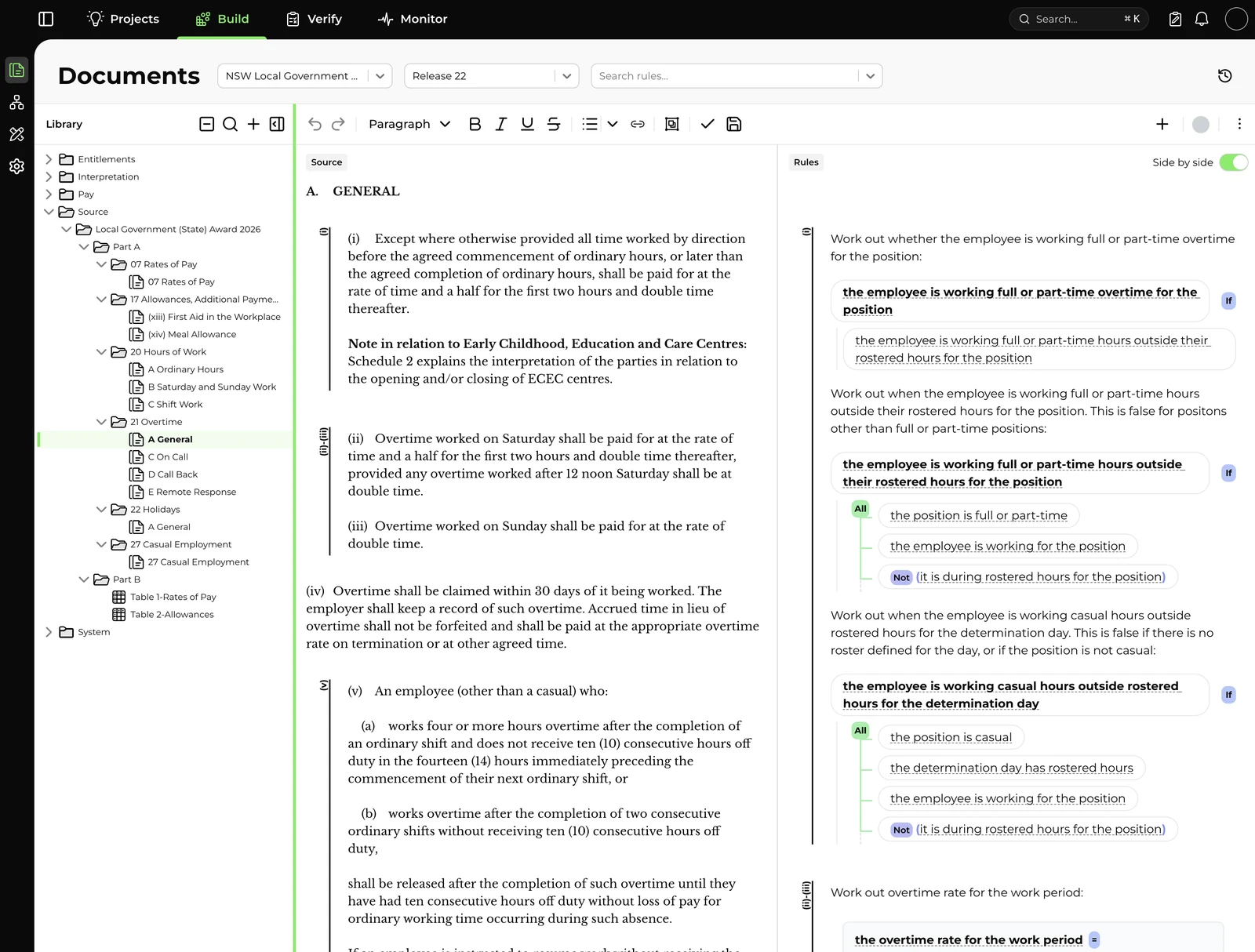
Our NSW Local Government project holds the award’s own text beside the rules written from it. A decision report for every work period then shows each conclusion with the facts assessed, the conditions evaluated and the clause relied on: the evidence for payroll review, employee enquiries, disputes and audit.
| Time | Hours | Why | Outcome |
|---|---|---|---|
| 9.30 am to 5.00 pm, less the 30-minute unpaid meal break | 7.0 | The agreed ordinary hours, inside the Libraries span of 8.00 am to 9.00 pm, so no shift penalty (cl. 20C(ii)) | Ordinary hours, paid in the weekly rate |
| 5.00 pm to 7.00 pm | 2.0 | Worked by direction after the agreed completion: the first two hours (cl. 21A(i)) | Overtime at 150%, $90.00 |
| 7.00 pm to 7.15 pm | 0.25 | After the first two hours: double time thereafter (cl. 21A(i)) | Overtime at 200%, $15.00 |
| Overtime for the day | 2.25 | $90.00 + $15.00 | $105.00 |
| Meal allowance | Instructed to work overtime for two hours immediately after the agreed finishing time of 5.00 pm (cl. 17(xiv)(a)(ii)), at the amount in Table 2 of Part B from the first pay period on or after 1 July 2026. Not payable where, by agreement, a meal is provided by the employer, or where the employee is working from home. | $19.93 | |
| Paid for the day, beyond the weekly rate | $105.00 + $19.93 | $124.93 |
2.0 × $30.00 × 1.5 = $90.00. 0.25 × $30.00 × 2.0 = $15.00. $90.00 + $15.00 = $105.00 in overtime, and $105.00 + $19.93 meal allowance = $124.93. The same rules also confirm that the employee worked no more than five hours before the unpaid meal break and 4.75 hours after it (cl. 20A(vii)), that ordinary hours stayed within 12 in the day (cl. 20A(viii)), and that clause 21A(v) does not arise: the overtime is less than four hours, and the employee had ten consecutive hours off duty both before Wednesday’s shift and before Thursday’s 9.30 am start. The Table 1 rate is the award’s entry-level rate; a council pays its own salary system rate, which is set at or above it (cl. 7 and 8).
the employee is working full or part-time overtime for the positionSatisfied
Value:trueAward 21A(i) · work period Wed 5.00 pm to 7.15 pm
the employee is working full or part-time hours outside their rostered hours for the positionSatisfied
Value:trueAward 21A(i)
the position is full or part-timeSatisfied
Value:trueInput
the employee is working for the positionSatisfied
Value:trueInput
Not (it is during rostered hours for the position)Satisfied
Value:trueAward 21A(i)
it is during rostered hours for the positionNot satisfied
Value:falseRoster · 9.30 am to 5.00 pm
the overtime rate for the work period
Value:1.5Award 21A(i) · 5.00 pm to 7.00 pm, the first two hours
the overtime rate for the work period
Value:2Award 21A(i) · 7.00 pm to 7.15 pm, thereafter
the employee is entitled to a meal allowanceSatisfied
Value:trueAward 17(xiv)(a)(ii)
the employee was instructed to work overtime for two hours immediately after their agreed finishing timeSatisfied
Value:trueAward 17(xiv)(a)(ii) · 5.00 pm to 7.00 pm
Not (a meal is provided by the employer by agreement)Satisfied
Value:trueAward 17(xiv)(a)
a meal is provided by the employer by agreementNot satisfied
Value:falseInput
Not (the employee is working from home)Satisfied
Value:trueAward 17(xiv)(a)
the employee is working from homeNot satisfied
Value:falseInput
Services as Software covers the shared base, your tenancy and the services that get you live and keep you current.
Pre-configured to both state awards and kept current at every refresh, alongside the timesheets you run today.
Digital timesheets on a best-practice configuration aligned to the award.
Compliant rostering, with coverage and each person’s qualifications checked as shifts are planned.
The complete roster-to-pay process on one tenancy, with no re-implementation as you add modules.
Your HR system stays the system of record for employees, positions, leave and cost centres, and your payroll keeps paying. NSW Council Cloud interprets both awards and your council’s own layer in real time between them.
Coverage checked before the roster is published, leave that lands on a published shift, availability and open shifts, time recorded against the rostered shift, and staff told what was decided. Approved time is then interpreted against both awards and goes to payroll as pay codes, hours and units.
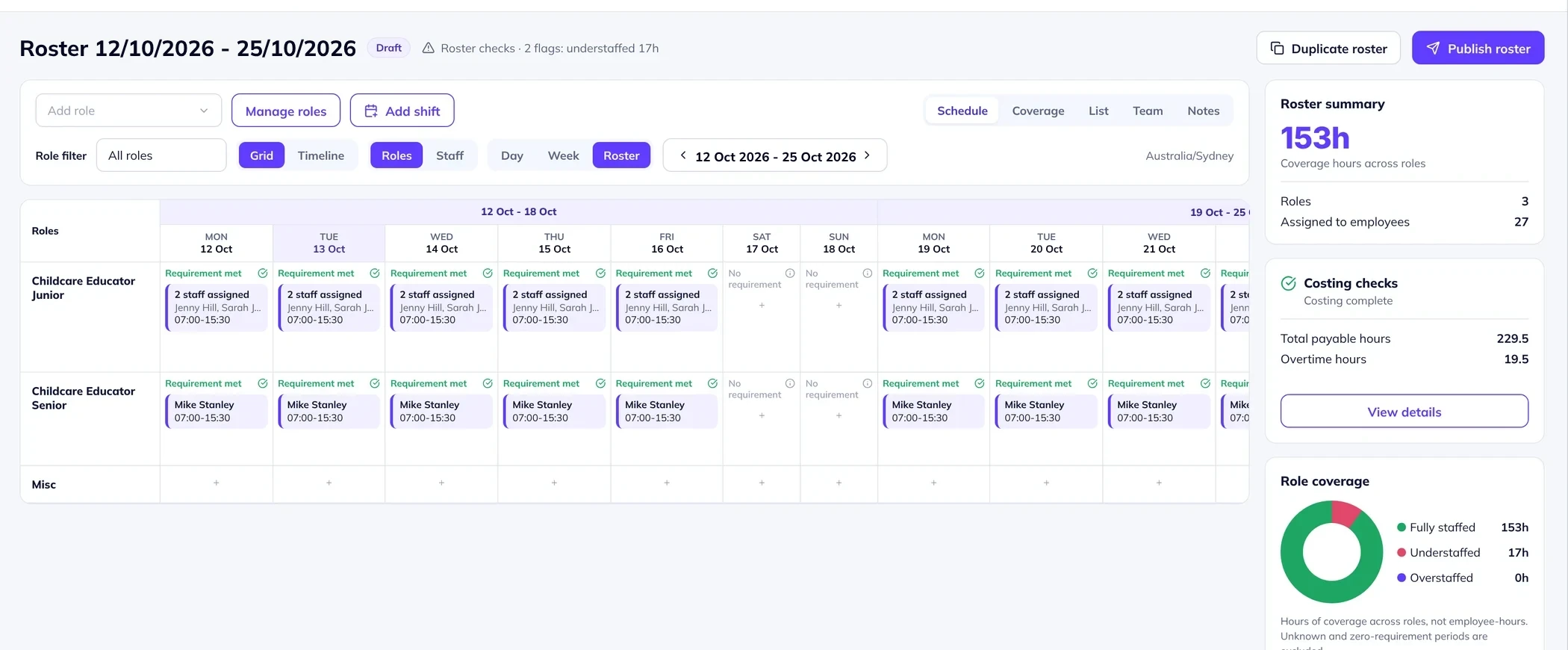
The manager’s period view shows each role’s shifts day by day and whether its staffing requirement is met, with the payable and overtime hours totalled before the roster is published.
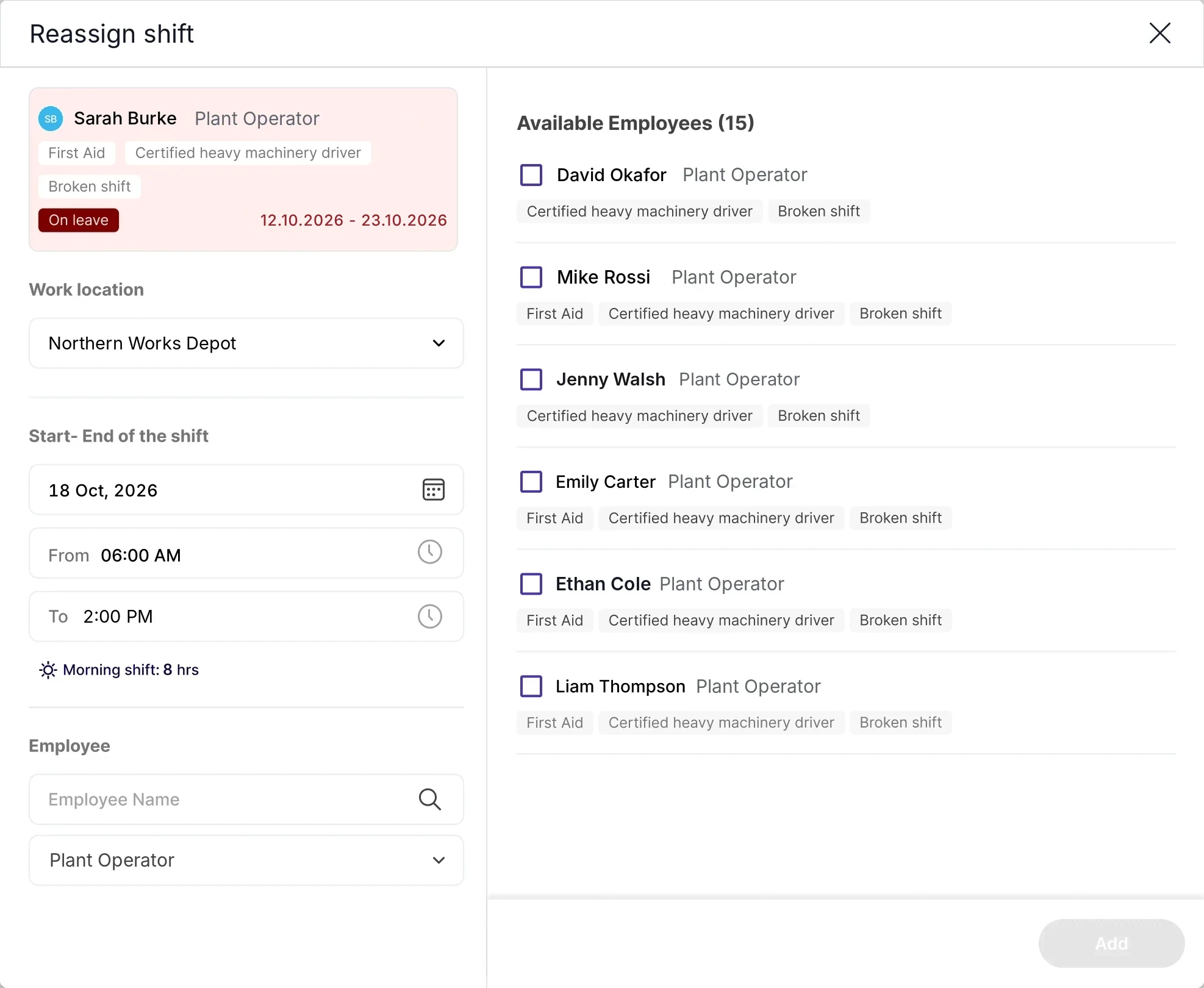
When leave is approved for a rostered shift, the manager is alerted and reassigns it to available staff with the right skills.
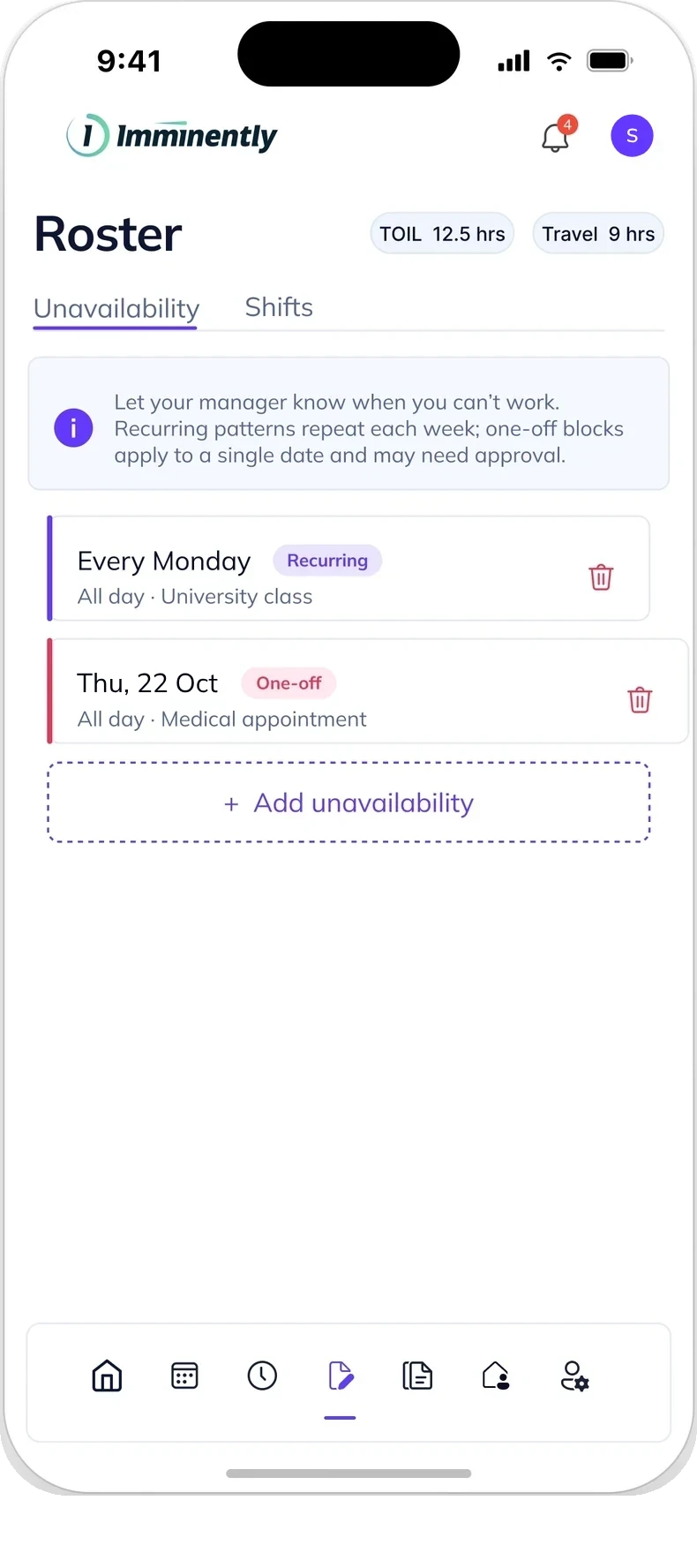
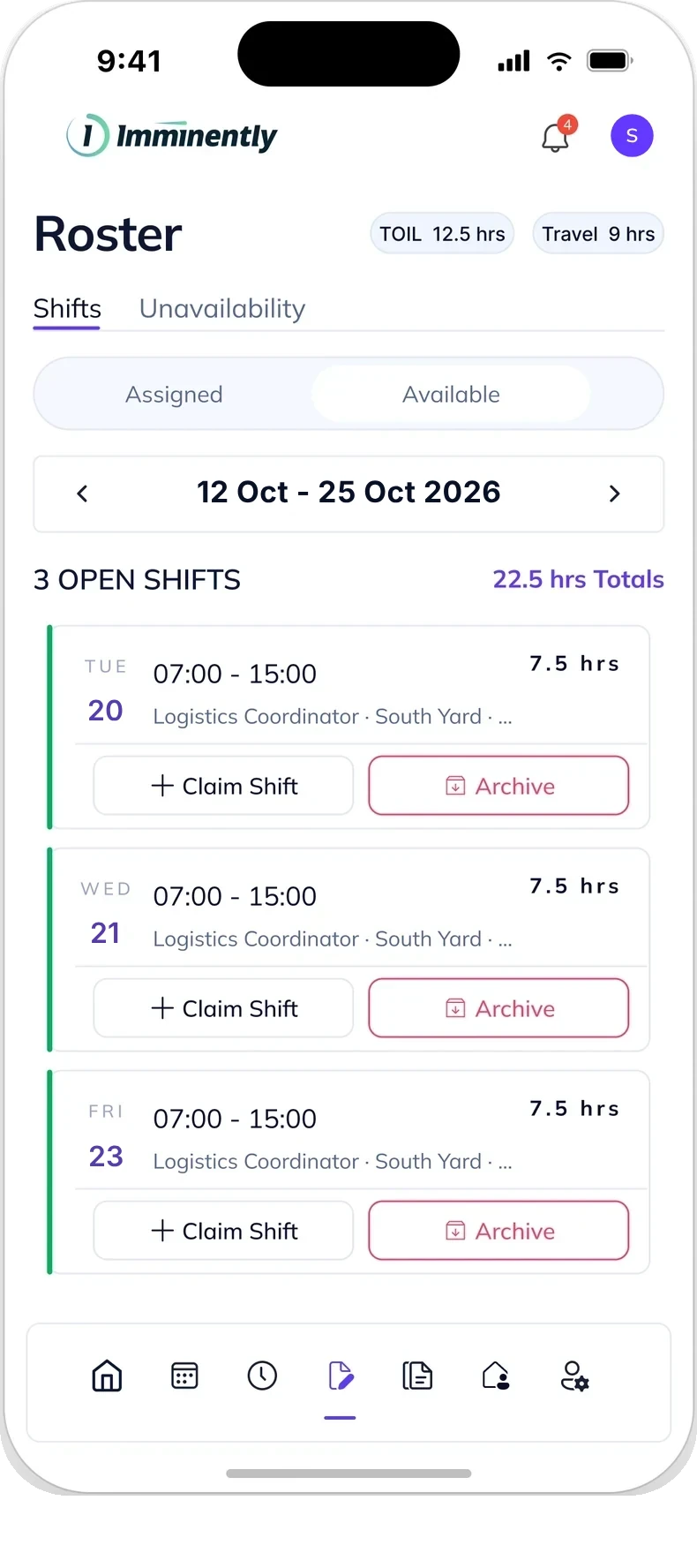
Recurring and one-off unavailability is visible to the manager when rostering, and open shifts are offered only to staff eligible to work them.
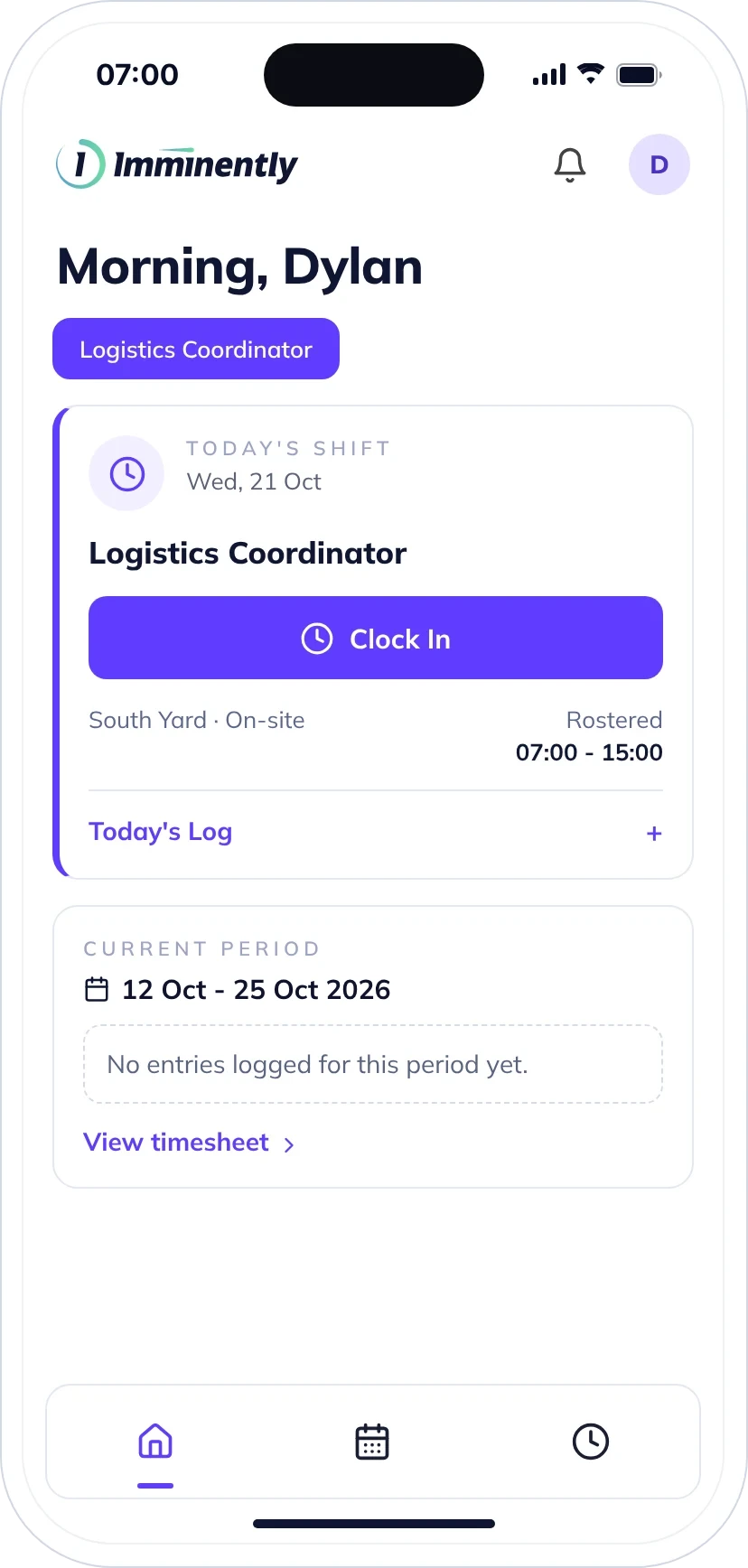
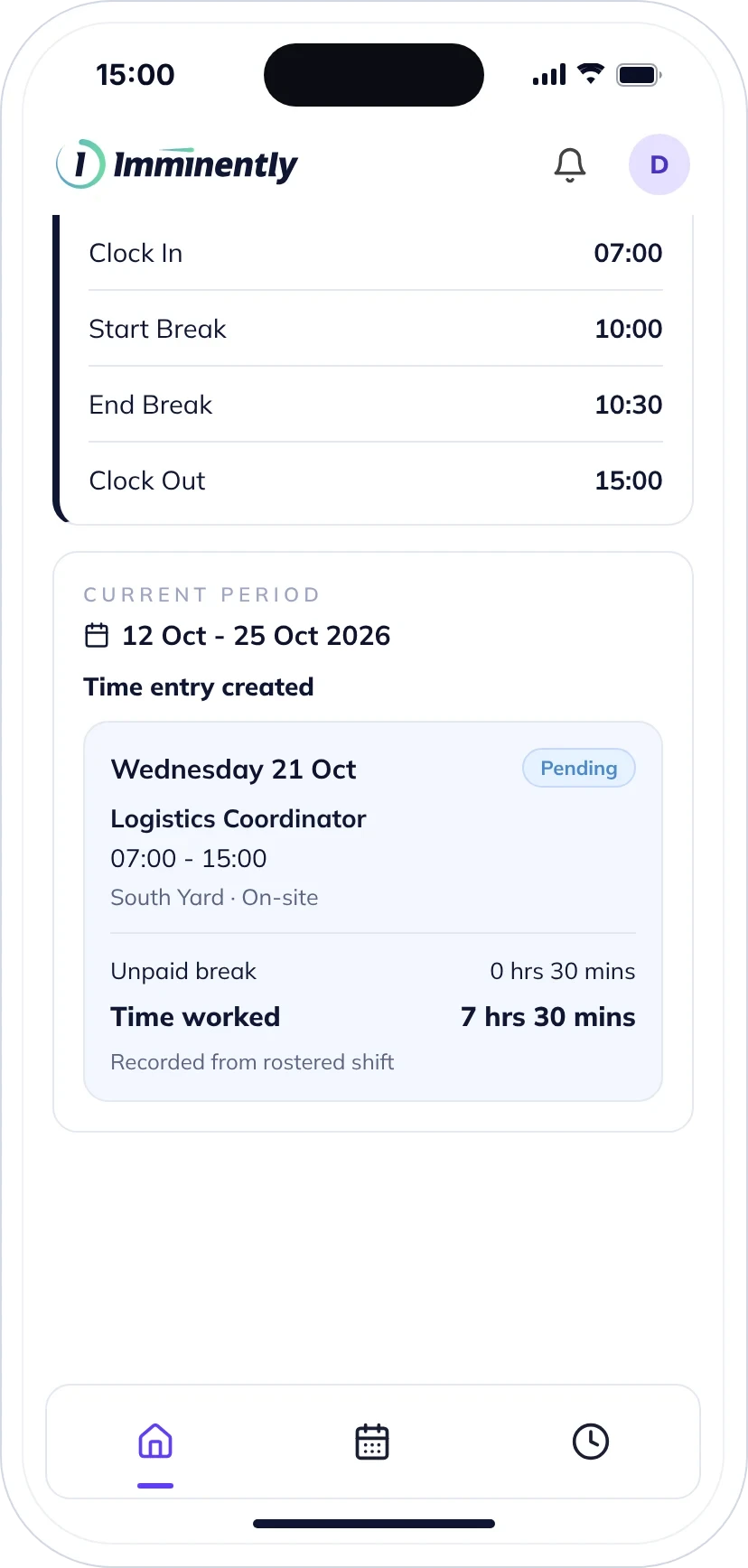
The rostered shift is waiting in the app with one Clock In button. At the end of the day the clock events become a time entry against that shift, with the unpaid meal break deducted, ready for approval.
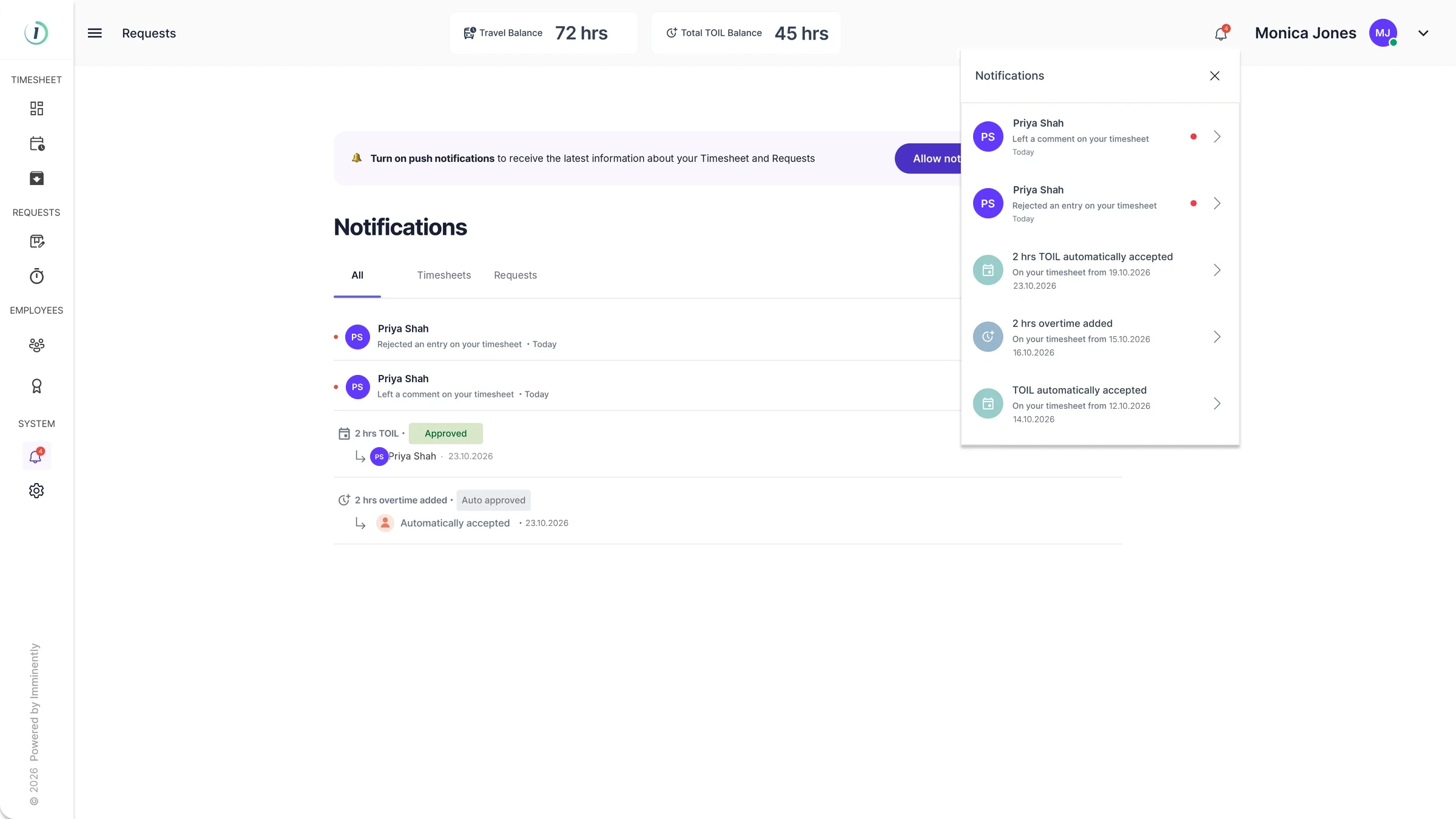
Notifications tell the employee when overtime or time in lieu was accepted automatically, or when a manager commented on an entry.
People, locations, hours and amounts shown are examples.
The NSW council rostering use cases were co-designed with councils, and the template carries twenty council rostering cohorts and sixteen exception scenarios built against the award.
The City of Karratha in Western Australia, the City of Salisbury in South Australia, and Central Coast Council and the City of Ryde in New South Wales have chosen our product, each under the awards and agreements that apply to it.
Data in Australian data centres on Microsoft Azure, each council in its own tenancy, with ISO 27001 certification and a SOC 2 Type 2 report.
No. The base is shared: both state awards and a best-practice configuration, maintained once. Each council’s tenancy carries its own council agreements, flexible working arrangements, policies, pay codes, roster models and data, and its enterprise agreement where it has one.
Yes. It is scoped with you and digitised as your own date-effective layer for the cohort and period it covers, limited to the provisions clause 43(ii)(a) allows, and tested against your own scenarios. If it is terminated, the savings provision in clause 45(ii)(b) and (c) applies to the employees it covers.
An enterprise agreement build is added to your tenancy as part of your own layer on the shared base, so the provisions it leaves to the award keep using the maintained award rules.
Yes. The Local Government (Electricians) (State) Award is part of the shared base, alongside the Local Government (State) Award 2026. A council agreement under its clause 33 is scoped as part of your own layer.
Nothing on the rules. We update the shared base once, regression test it, run your own scenarios against your layer and release it to every tenancy with its effective date. Earlier periods keep the rules that applied.
Yes. Start with Imminently Awards alongside the timesheets you run today, then add Imminently Timesheets and Imminently Rosters on the same tenancy, with no re-implementation.
Through the certified adapter: employee, position, work pattern, leave and delegation data in, and interpreted pay codes, hours and units out to TechnologyOne Payroll. Other HR and payroll systems connect through our open integration.
In Australian data centres on Microsoft Azure, in your council’s own isolated tenancy.
Bring your council agreements, your flexible working policy and a difficult pay period. We will show the shared base and your own layer working together.